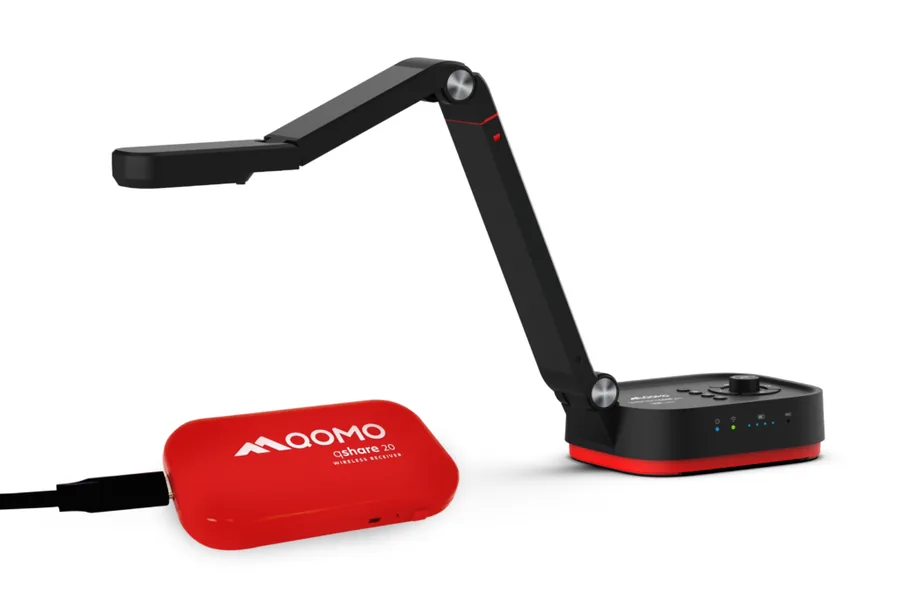
Most NZ schools have an interactive panel on the wall. A good number of them use it mainly as a display for slides. That is fine, but it is only part of what the technology can do. The missing piece is often a document camera: a small overhead camera that connects to the panel and shows whatever is placed beneath it, instantly and in real time, on the screen for the whole class to see.
It sounds simple. In practice, it changes a lot about how a lesson feels.
What a document camera actually does
A document camera is a high-resolution camera mounted on an adjustable arm, designed to point straight down at a flat surface. Anything you place under it, a worksheet, a page from a book, a science specimen, a student's handwritten working, appears live on the panel screen at the front of the room. No scanning, no photographing, no fumbling with cables to share from a phone. You just hold it up, or lay it down, and the class sees it immediately.
Unlike a webcam or a phone camera, a document camera is optimised for this specific job. It has a macro lens that focuses sharply on close objects, lighting that illuminates without glare, and image processing that handles the contrast between a white page and dark text better than a general-purpose camera. The result is a crisp, readable image even for the student at the back of the room.
The use is not limited to documents. Science teachers use them for live dissections and specimen examination. Art teachers use them to demonstrate brushwork or technique at full scale on the panel. Maths teachers use them to show physical manipulatives. The camera does not care what you put under it, and neither do the students.
The problem with wired document cameras
Traditional document cameras have a USB or HDMI cable running from the camera to the panel or a laptop. This works, but the cable is always in the way. The camera lives on the teacher's desk, pointing at a fixed spot. If you want to show something from the other side of the room, or hand the camera to a student at their table, the cable stops you. The camera stays put, and so does the interaction.
This is why most wired document cameras end up being used less than teachers expect. The setup works, but the constraints shape the habit. The camera is useful for showing something at the front of the room. For anything more dynamic than that, teachers revert to holding things up in front of the panel and hoping the back row can see.
Why wireless changes the classroom
Remove the cable and the camera becomes a different tool entirely.
A wireless document camera can go anywhere in the room. The teacher can carry it to a student's desk and show the class that student's working without asking them to come up the front. Students can be handed the camera and asked to show their own work, their own experiment, their own solution, to the group. The interaction moves from the front of the room to everywhere in the room.
That shift is not small. One of the most effective things you can do for classroom engagement is show student work to other students. It validates the work being done, creates a reason for students to pay attention to each other's ideas, and generates the kind of peer discussion that deepens understanding. A wireless document camera makes this easy. It takes about three seconds to show a student's work to the class. With a wired camera, you'd have to ask the student to bring their book to the front. Most of them won't. With a wireless camera, you bring the camera to them.
David's take
Every time I show the WanderCam Pro to a teacher, I demonstrate it by walking around the room filming things. Their expression changes when they realise the image is just there, on the panel, in real time, from wherever I'm standing. That is the moment it clicks. It is not a fancy document scanner. It is a way to put anything in the room on the screen in seconds.
The Qomo WanderCam Pro
The Qomo WanderCam Pro is the wireless document camera Edtex recommends for NZ schools. It connects directly to an interactive panel via WiFi, displays a live image at up to 4K resolution, and requires no software installation on the panel to use. You power it on, connect to its wireless signal, and it works.
The camera head rotates 340 degrees, so it can point in any direction, not just straight down. Teachers use this to show the front of a book, point the camera at a physical model on a shelf, or film a science demo in progress on the bench. The flexible arm means you can shape it however the task requires.
Battery life is sufficient for a full school day of use, and it charges via USB-C between classes or overnight. The design is compact enough to sit in a bag or be handed between students without being awkward. It is also robust enough for classroom use, which is something worth asking about with any piece of school technology.
For schools that also want a fixed camera solution for recording or conferencing, Qomo's 4K AI ePTZ camera is a separate product designed for that purpose: it auto-tracks the teacher around the room, useful for recording lessons or running hybrid sessions. The WanderCam Pro and the ePTZ camera address different needs and can work alongside each other in the same classroom.
How kaiako are using it
The use cases that come up most often from NZ teachers using the WanderCam Pro:
- Sharing student work without embarrassment. The teacher carries the camera to the student, gives them the choice to share or not, and shows the class what good looks like without putting anyone on the spot.
- Live maths working. Students write working on paper at their desk. The teacher films it and walks the class through where the thinking went right or wrong, on the screen, as a worked example.
- Reading and literacy. Show a page of a shared text on the panel while students have their own copy open. The teacher can underline, point, and annotate directly on the panel while the image is live.
- Science demonstrations. Small specimens, chemical reactions, dissections, or experiments that would normally only be visible to students at the front bench are shown to the whole class in real time.
- Art and design feedback. Student artwork is shown at panel scale, making it possible to give detailed feedback that the whole class can learn from, without moving the artwork.
- Assessment and marking. Teachers can quickly film and display multiple student responses to a question, facilitating comparison and discussion without collecting and scanning anything.
How it connects to your panel
The WanderCam Pro connects to your interactive panel via the QShare 20 Bluetooth receiver, which pairs effortlessly without any need for a WiFi network or line of sight connection. Once paired, the live camera feed appears on the panel. On Promethean, BenQ, Newline, and ViewSonic panels, the process is straightforward and does not require IT involvement or network configuration.
The camera can also connect via USB-C to a laptop or panel for a wired connection if preferred, though most teachers using it via the Bluetooth receiver do not revert to wired.
What does it cost?
The Qomo WanderCam Pro is priced at a level that makes it accessible as a per-classroom or per-department purchase rather than a whole-school rollout. It sits comfortably below the cost of most classroom AV peripherals of comparable quality.
Contact Edtex for current NZ pricing. As an authorised Qomo reseller, Edtex can supply single units or school-wide quantities, and can demonstrate the WanderCam Pro on your existing panel before you commit to a purchase.