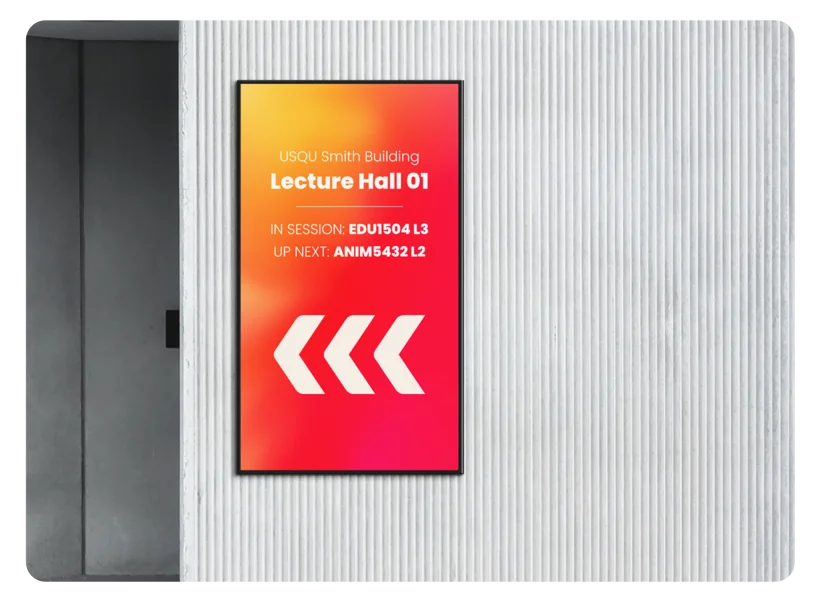
Schools are increasingly using digital signage, and it makes sense. A screen in the reception that shows today's timetable, upcoming events, and a welcome message for visitors does more than a noticeboard ever could, and takes less time to maintain once it's set up. But the category is broader and messier than most people expect when they start looking into it. This article covers everything you need to know before you commit to anything.
What is digital signage, and how is it different from classroom interactive panels?
Digital signage is any screen used to display information or content to an audience, where the content is managed remotely or automatically rather than someone physically operating the screen. Think of the screens in airport departures boards, shopping mall directories, or the display behind the counter at a cafe. In a school, the same technology gets applied to receptions, corridors, gymnasiums, and outdoor areas.
The key difference from a classroom interactive panel is purpose. Interactive panels are two-way: teachers and students touch them, annotate over content, cast from devices. Digital signage is one-way: content is scheduled or live-updated, the screen displays it, nobody touches it. This affects everything from the hardware you buy to the software you run.
It also means digital signage screens do not need to be in a classroom and do not need to be interactive. A commercial-grade screen on a wall in the corridor, showing a daily schedule pulled from your school's calendar, is the simplest version of what this category covers. A four-screen outdoor display showing live weather and school sports results is a more complex version of the same thing.
Where NZ schools are using digital signage
The most common locations Edtex sees digital signage installed in NZ schools are:
Reception and front office
This is the highest-value location for most schools. A screen in reception that shows a welcome message, today's schedule, staff on duty, and upcoming events tells visitors what they need to know without staff having to field the same questions repeatedly. It also looks professional. Many schools start here and find it works so well they expand from there.
Corridors and common areas
Corridor screens are good for schoolwide communication: assembly reminders, lunchtime club notices, sports results, and student achievement shoutouts. The challenge is managing the content so it stays current. Schools that get this right usually have a simple workflow where one admin person or a student committee updates it weekly. Schools that get it wrong end up with screens showing Christmas notices in March.

Sports halls and multipurpose halls
Larger screens in gyms and halls serve a different purpose: event-day communication, scoreboard displays, and sponsor recognition. If your school hosts interschool sports events, community hire, or performances, a display solution in the hall adds a level of polish that matters to parents and external visitors. It also means you're not printing and taping paper signs to the walls for every event.
School library and resource centres
Library screens are often used to show opening hours, new book arrivals, reading challenges, and links to databases. Lower traffic than reception, but the audience is self-selecting and engaged, so the content lands.
Outdoor screens
Outdoor digital signage is a separate category with its own requirements, covered below. It is the most expensive option and requires the most planning, but some schools find it essential for communication with students and parents arriving each morning.
David's take
Reception is almost always where I recommend schools start. It is the one location where every visitor, every parent, and every prospective family sees the screen. The ROI on a single well-placed reception display is higher than three corridor screens that nobody updates. Get that one right first, then expand.
Commercial vs consumer screens: why this matters for schools
This is the part most schools get wrong, and it costs them money later.
A consumer TV from Harvey Norman or Noel Leeming is not designed to run for 12 to 16 hours a day, five days a week, 40 weeks a year. Consumer screens are tested and warranted for a few hours of daily viewing in a home. Run them in a school corridor on a full display schedule and you will burn through the backlighting within two to three years. The picture quality degrades noticeably, the screen develops bright or dark patches, and you end up replacing it.
Commercial-grade signage screens are built for exactly this use case. They have higher-rated backlights, better cooling, more robust panels, and warranties that cover commercial use. They also usually have a built-in media player or a simple input for an external player, which consumer TVs often lack. They cost more upfront, typically 20 to 40 percent more than an equivalent-size consumer screen, but over a five to seven year lifespan the commercial screen is the cheaper option.
The other advantage of commercial screens is the mounting and installation flexibility. Many are designed to be installed in portrait orientation, which is useful for corridor screens. They have proper VESA mounting specs for ceiling and wall rigs. And they are typically thinner and purpose-built for public environments, which matters in schools where students will walk past them daily.
David's take
I have been called in to replace consumer screens that schools bought to save money at the start. It never actually saves money. If you are putting a screen in a public area of your school, buy commercial. The conversation is over.
How content gets on the screen
The hardware is only half the picture. You also need a way to get content onto the screen and update it over time. This is where digital signage software comes in.
Most digital signage setups use a small media player device connected to the screen (or built into the screen itself) that runs signage software. You manage what the screen shows from a browser-based dashboard, usually from any device on your network. You can schedule content to change at specific times, set up playlists that rotate through slides, pull in live data like weather or calendar feeds, and push updates to multiple screens at once.
Common platforms used in NZ schools include Fusion Signage, ScreenCloud, and Google Slides pushed via Chromebox or Chrome devices. Fusion Signage is a purpose-built education platform with strong NZ support and features designed around how schools actually operate, including direct calendar integration, student recognition modules, and emergency alert overrides. It is the platform Edtex recommends and installs for most school digital signage projects. Google Slides via a Chromebox is a lower-cost entry point for schools already in the Google Workspace ecosystem, though it has fewer automation features.
The software cost is typically a monthly or annual subscription per screen. Entry-level platforms run around $15 to $30 NZD per screen per month. Purpose-built education platforms can include features like direct calendar integration with SchoolPoint or KAMAR, student recognition modules, and emergency alert overrides.
One thing to clarify with any vendor: does the subscription include the media player hardware, or is that separate? Some platforms bundle a player device with the subscription. Others assume you are bringing your own. This affects the total cost of the project.
Outdoor digital signage for schools
Outdoor digital signage is a growing category in NZ schools, particularly at school entrances and near sports fields. It is also the most demanding environment you can put a screen in, and the requirements are genuinely different from indoor signage.
An outdoor screen needs to be:
- Weatherproof to IP65 standard or higher so it handles rain, dust, and humidity without failing
- High brightness, typically 2,500 to 5,000 nits, so it remains readable in direct sunlight (an indoor screen at 400 nits becomes invisible outdoors in daylight)
- Temperature-controlled with active cooling and heating so it operates in both summer and winter extremes
- Vandal-resistant with toughened glass and robust housing
- Properly installed on a structural mount rated for wind loads, with weatherproof cabling runs
All of this adds cost. An outdoor commercial display starts at around $4,000 to $6,000 NZD for a 55-inch screen, before installation. Larger format displays or LED panels run significantly higher. This is not a consumer TV in a weatherproof box: the engineering behind a properly rated outdoor display is substantial.
That said, for schools on busy roads or with large morning arrival traffic, an outdoor display is one of the most visible communication tools available. A well-placed screen at the school gate showing the morning schedule, sports day reminders, or community messages is seen by hundreds of people daily.
What does school digital signage cost in NZ?
Costs vary considerably depending on screen size, quantity, indoor versus outdoor, and the software platform chosen. As a general guide:
Single indoor reception screen (commercial-grade, 55-inch, installed with media player and software setup): $2,500 to $4,500 NZD. This is the most common starting point for NZ schools and covers the screen, mount, media player, cabling, installation, and first-year software costs.
Multi-screen corridor or campus installation (3 to 6 screens, same content network): $6,000 to $14,000 NZD depending on screen sizes and cable runs. Software is usually priced per screen so larger installations benefit from platform volume pricing.
Outdoor single screen installation: $7,000 to $14,000 NZD including the outdoor-rated display, structural mounting, weatherproof cabling, and software. Higher if a new power supply needs to be run to the location.
Sports hall or multipurpose hall display (large format, 75 to 86 inch): $4,000 to $8,000 NZD installed. If you need a scoreboard function alongside general signage, the software requirements and hardware spec increase accordingly.
Software ongoing costs are typically $200 to $600 NZD per year per screen depending on platform and features. Some schools negotiate multi-year deals upfront for better rates.
Is it worth it for your school?
The honest answer is: yes, in the right locations, with the right expectations.
Digital signage earns its cost when it replaces something a staff member is currently doing manually, when it communicates information that genuinely affects how parents or visitors experience your school, or when it supports events and community activity in a way that paper signage cannot. A reception screen that saves the office staff from answering the same three questions every morning is worth it. A corridor screen that nobody updates and shows stale content within six weeks is not.
The setup effort is real. Someone at your school needs to own the content, build a workflow for keeping it current, and be willing to invest a few hours at the start to get the template and schedule right. Schools that do this upfront find the system runs almost by itself after that. Schools that skip it find the screens get ignored and switched off within a year.
If you are thinking about digital signage for your school and want to talk through what would actually make sense for your site, contact David. No pressure, just a straight conversation about what works in NZ schools and what does not.